■ OpenAI · MCP clientQuickstart · 2 min
ChatGPT × Hail
ChatGPT speaks MCP through Plugins, the surface formerly called Apps and Connectors. Add Hail once on the web. Every chat on web and desktop can then reach the toolset.
ChatGPT WebChatGPT DesktopCustom GPTs

Setup
~60 seconds · no API key01
Drop Hail into your config
Add the Hail MCP server using the snippet below. Paste it where this client expects MCP servers. The path varies, the shape doesn't.
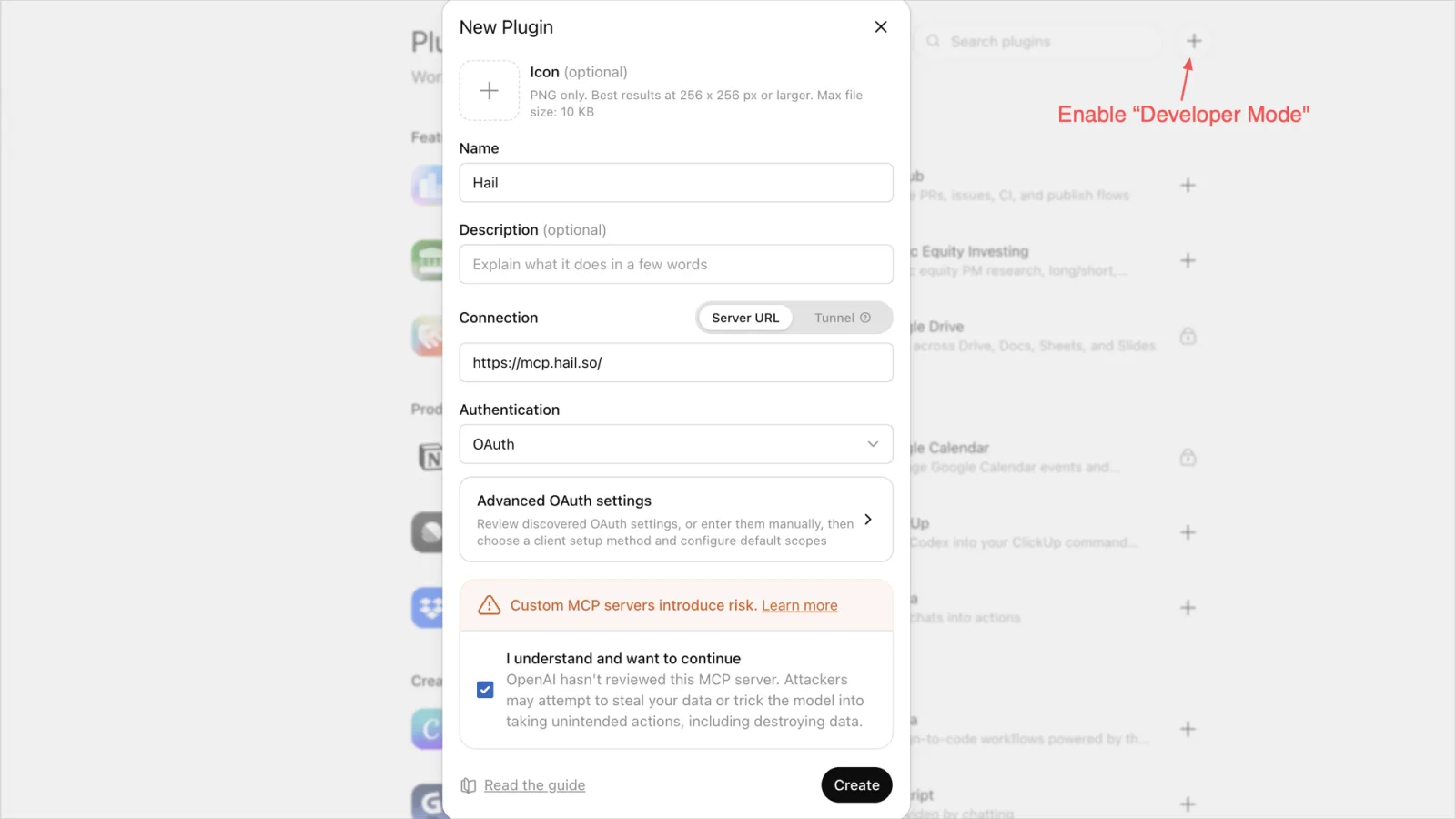
Plugins → Developer mode → + → New Plugin
URL · New Plugin · Server URL · Authentication: OAuth
https://mcp.hail.so
02
Click Allow. Then try it.
Reload the client. On first use it pops a browser tab. Sign in to Hail, or sign up in 30 seconds. Click Allow and tokens flow back to the client. Then send the prompt below. If a call is placed, an SMS lands, or an email shows up in the inbox view, you're done.
"Send an SMS to +1-415-555-0123 saying tomorrow's meeting moved to 3pm."
■ Notes
Developer modeEnable it on the Plugins page. The + button then offers New Plugin.
CreateName: Hail. Connection: Server URL, paste the URL. Authentication: OAuth. Confirm the trust prompt. Click Create.
PlansPlus/Pro: read tools only. Full tools: Business, Enterprise, Edu (beta, admin-enabled). Free: none.
WhereCreate on the web only. Enable per chat from the + / tools menu.
WorkspacesNew plugins land as Drafts. An admin publishes them.
PrivacyChat history never reaches Hail. Only tool arguments do.
ManageRevoke or manage this app at hail.so/console/apps.
Self-hostSet HAIL_API_KEY as the bearer. See docs/mcp.
Hail your first call from this client.
Self-host on your own carrier or claim a managed number. Either way, your agent picks up the phone in ~120 seconds.
■ Also available for


